Context usage and compaction
Every model has a context-window limit. As a conversation grows, messages, attachments, Tool results, and the current input use more of it. Compaction summarizes older content into a shorter context for later responses.
Read context usage
Hover over the circular percentage at the right of the composer to reveal its details. If you dismissed the panel, move the pointer away and back over the percentage to reopen it.
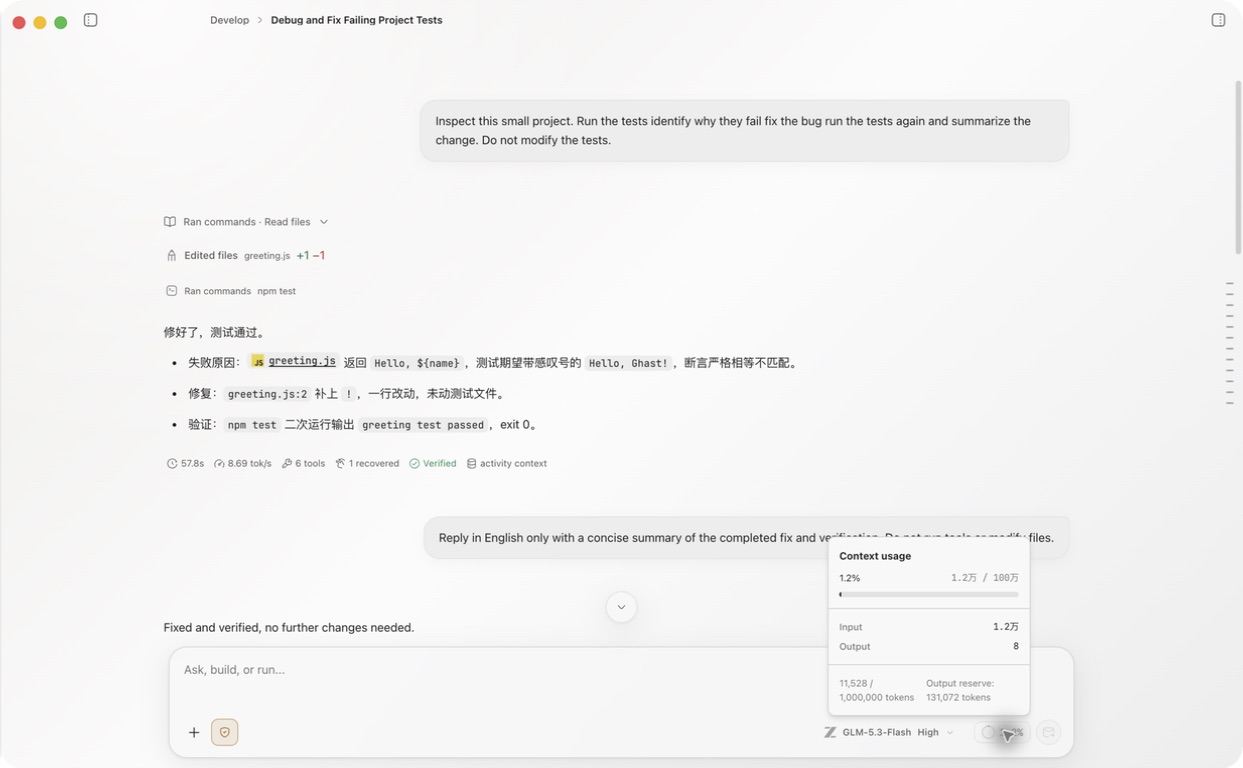
The panel can show:
| Field | Meaning |
|---|---|
| Used / limit | Estimated current tokens and the model context window |
| Input | Input tokens used by the request |
| Output | Generated output tokens |
| Reasoning | Reasoning tokens reported by a supported model |
| Cached | Cache reads reported by a supported Provider |
| Output reserve | Space reserved for the next response |
Fields vary by model and Provider. Switching models recalculates the displayed limit and percentage for the new model.
Will compact before next request indicates that the request is near a compaction condition. Auto-compact can start at the Settings → Chat behavior → Auto-compact threshold, or earlier when there is not enough room to reserve the next maximum response. Large attachments or Tool outputs can raise usage quickly.
Auto-compact
Under Settings → Chat behavior → Auto-compact, you can enable or disable automatic compaction, set the trigger threshold, and choose how many recent user turns remain outside the summary. Ghast also tries to retain at least about 16% of the recent token tail, so more detail can remain.
After a successful compaction, context usage refreshes. The current timeline does not show a visible Context compacted entry or a success notification. On an automatic failure, Ghast keeps the original context and enters an approximately 60-second cooldown; the failure may not show a UI error.
Compact manually
Send this in the composer:
/compact
Send the command alone, without additional instructions. Ghast attempts to compact the current conversation. Reopen context usage afterward to check the change. Success has no separate notification; no eligible older content or insufficient savings may leave usage unchanged. Too little history can instead produce an error. See manual compaction for steps and recovery.
What changes after compaction
- A summary replaces older messages; recent user turns and the retained token tail remain according to the current strategy.
- A summary can omit detail, so restate critical constraints, paths, numbers, and open work after compaction.
- Compaction does not delete the whole conversation or reverse files and external actions.
- Continuing the original conversation uses its summary. Whether a branch inherits compaction depends on the branch point; when that point lacks the compaction marker, older original messages can enter the branch again and increase usage. Do not treat a branch as cleared context.
- When the goal, workspace, or permission scope has changed, a new conversation is often clearer than repeatedly compacting the old one.
See Context compaction for the broader settings guide.