Tool approvals and command safety
Ghast security is not one master switch. Composer command authorization, Tool selection, per-request Tool approval, and operating-system or external-service permissions control different layers.
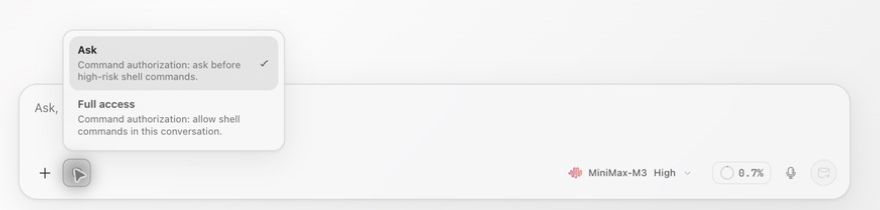
Two command modes
Before sending a task, open the shield-shaped Command authorization control beside Add (+) in the composer. Choose Ask or Full access, then reopen the menu to confirm the selected mode. Check the current conversation rather than assuming another conversation's choice carries over.
| Option | Interface behavior | Good default for |
|---|---|---|
| Ask | Ask before a high-risk shell command runs | First use, unfamiliar projects, sensitive work |
| Full access | Directly allow shell commands plus file reads and writes in the current conversation; shell execution is unrestricted | Confirmed paths and impact under continuous supervision |
Ask applies to shell commands that require confirmation. It does not mean every command shows a dialog. A new conversation currently defaults to Full access. A regular Chat or Coding branch created from an Ask conversation does not copy that authorization and returns to Full access. When workspace changes after messages exist, regular Chat uses the new-conversation default, while a new Coding conversation carries the current Ask or Full access choice. Recheck authorization after starting, branching, or switching sensitive work. Full access does not grant operating-system folder, microphone, or Screen Recording permission, connect a third-party account, provide MCP credentials, or turn on a disabled Tool. Within Ghast's currently accessible scope, however, it directly allows shell and file access.
Respond to a Tool permission request
When a Tool needs additional permission, the conversation shows Tool permission required. Open Details and check the Tool, targets, workspace, and validity time before choosing:
The full card previews at most two targets and indicates when there are more. Do not assume those two entries describe the whole operation. Read the request details; if the complete scope remains unclear, deny the request and ask Ghast to narrow it.
| Action | Result |
|---|---|
| Allow once | Approve only this request |
| Allow always | Create an ongoing allowance for the matching scope shown by the interface; this is not the same as Full access for the conversation |
| Deny | Do not run this request; the model can continue with the denial result |
| Deny with reason | Explain why it should not run, then deny it |
| Abort turn | End the entire current run instead of denying only one Tool |
Requests expire. An expired card reads Approval expired · not authorized. When several requests are pending, the conversation and sidebar show their count; review each target separately.
Deny with reason and Abort turn are inside Details on the full card, not in its primary action row. A compact card exposes fewer controls; expand its heading to read the request before acting. Available labels can differ for a particular tool.
To redirect a task, use a specific denial reason such as “Do not modify this file; show the proposed diff first.” Denying one request lets the model continue, so inspect its next step. Choose Abort turn when you want the current run to end instead. Neither action reverses tools that already completed.
Four separate boundaries
1. Prompt
State allowed and prohibited actions explicitly:
Read only the current workspace.
Do not edit files, run commands, or use the web.
Report findings first and wait for confirmation before any change.
This is a task instruction, not a hard capability switch.
2. Tool, MCP, and Plugin selection
The current composer has no per-tool selector. Connected services and enabled plugins can provide capabilities, and loading a Skill can add its required tools. A named tool or Skill in your request is not an exclusive allowlist. Limit access through a controlled workspace, operating-system permissions and narrowly scoped service credentials; check command authorization and each approval request. None of these conversation controls is a guarantee of offline processing.
3. Command mode and Tool approval
These determine whether a specific action needs confirmation and whether a denied request ends the whole turn.
4. System and external permissions
Folder access, microphone, Accessibility, Screen Recording, third-party account permissions, and MCP credentials remain controlled by their respective systems. Command authorization does not replace them.
Before approving
- Does the Tool match the task?
- Are the path, URL, app, or external target correct?
- Is the action reading, writing, deleting, sending, or executing?
- Is the scope of Allow always broader than this one request?
- After denial, should the model continue or should you Abort turn?
After a run
An error, denial, or stopped run does not prove that earlier actions made no change. Check files, processes, and external objects before retrying.
Computer Use, MCP, and Channels have separate permission and data boundaries. See Computer Use, MCP security, and Channels.