Use Memory
Memory stores facts and preferences that remain useful in later work. By default it lives on this device under the current Profile. It is not automatically present on another computer, and it is separate from the current conversation context.
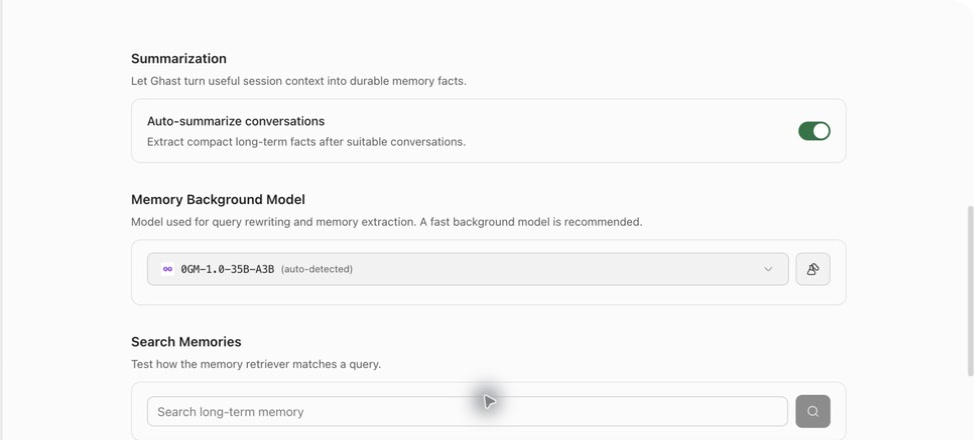
Configure Memory
Open Settings → Memory and review:
| Setting | What it does |
|---|---|
| Enable memory | Allows durable facts to be saved and existing memory to be retrieved. |
| Auto-retrieve relevant memories | Searches for records related to the current request. |
| Rewrite search queries | Uses the Memory Background Model for a focused query in manual Settings-page search. Automatic Main Memory retrieval in ordinary Chat or Coding does not use this model rewrite. |
| Maximum retrieved memories | Limits candidates in relevant-fact retrieval, not all Memory content attached to a request. Main Memory L1 is further capped at five items, while L2/L3 and Knowledge can be appended separately. |
| Auto-summarize conversations | Extracts durable facts after eligible conversations. |
| Memory Background Model | Runs query rewriting and memory extraction; use Test after choosing it. |
| Learn enduring preferences from conversations | Separately reviews explicit quotes for durable communication preferences; it does not enable reminders. |
Turning preference learning off stops new learning but keeps saved records. Turning Memory off does not delete existing content.
Click Save after changing these configuration controls. Search and record edits run immediately instead. See Memory settings for the complete setup and save/discard steps.
When automatic capture runs
Conversation capture requires all of the following:
- Enable memory is on;
- Auto-summarize conversations is on;
- a working Memory Background Model is configured;
- the conversation permits capture;
- a candidate fact passes the persistence decision.
Incognito conversations, heartbeats, internal side channels, and conversations with capture disabled do not enter ordinary Memory. A failed extraction or a run with no durable fact may have no separate visible receipt. Verify important facts in Recent Memories or Search Memories instead of assuming a reply was saved.
Enduring-preference learning is separate. It reviews explicit user wording for stable working or communication preferences. It does not enable Follow-ups; reminders are managed under Settings → Follow-ups.
Memory levels
| Level | Content | Main use |
|---|---|---|
| L0 | Raw, temporary conversation or activity records | Recent retrieval and extraction input. |
| L1 | Standalone durable facts | The primary unit for Recent Memories, editing, and routine retrieval. |
| L2 | Scenario indexes organizing related facts | Retrieval across a longer topic. |
| L3 | Stable core profile material | Durable high-level context. |
The L0–L3 counters do not mean every level is editable in one list. Recent Memories currently lists L1 only; search covers L0 and L1.
Scopes and management surfaces
| Scope | Created by | Managed in |
|---|---|---|
| Main Memory | Chat and ordinary tasks | Settings → Memory |
| Coding task facts | Coding conversations linked to a workspace | Main Memory, matched with task/workspace context |
| Teammate Memory | Work with one Team teammate | Teammate profile → Memory |
| Group Memory | Group chat and accepted work | Group settings → Group memory |
| Knowledge / Agent knowledge | Dedicated knowledge or Agent scope | Not managed by the Recent Memories list |
The personal Settings page can search, edit, and delete L1 records in Main Memory. It does not provide pin, archive, or restore. Group Memory provides invalidate, archive views, and restore; teammate memory is managed on the teammate profile. Do not assume controls are identical across scopes.
Use Memory in a task
Write a query that identifies the fact you expect:
Use the release format we agreed on earlier to organize this week's changes.
If that format is not retrieved, tell me instead of inventing it.
Afterward, inspect Retrieved memories or the run summary. Treat prices, account state, production status, permissions, and deadlines as time-sensitive even when remembered; ask Ghast to verify the current value.
Local and cross-device use
Memory stays on the current device and Profile by default. To sync it:
- open Settings → Data → 0G Storage sync;
- include Memories in the selected categories;
- upload the latest snapshot;
- on another device, use the same wallet and choose Pull latest.
The snapshot is encrypted with a key derived from that wallet; another wallet cannot decrypt it. Once sync is enabled, scheduled uploads follow the time shown in Data. Each upload can also create a 0G on-chain transaction, consume gas, and leave a public wallet transaction record. See Export, backup, and restore.
Before deleting
Personal Clear all is not a current-view cleanup. It clears Main Memory completely and deletes L1 records from every Team teammate and Group scope. L0, L2, and L3 in those Team scopes remain and can still be retrieved, as does Knowledge. Read the complete scope in Search, edit, and delete first.