Memory settings
Open Settings → Memory to control what Ghast saves and retrieves during later work. To find, correct, or remove existing records, see Search, edit, and delete Memory.
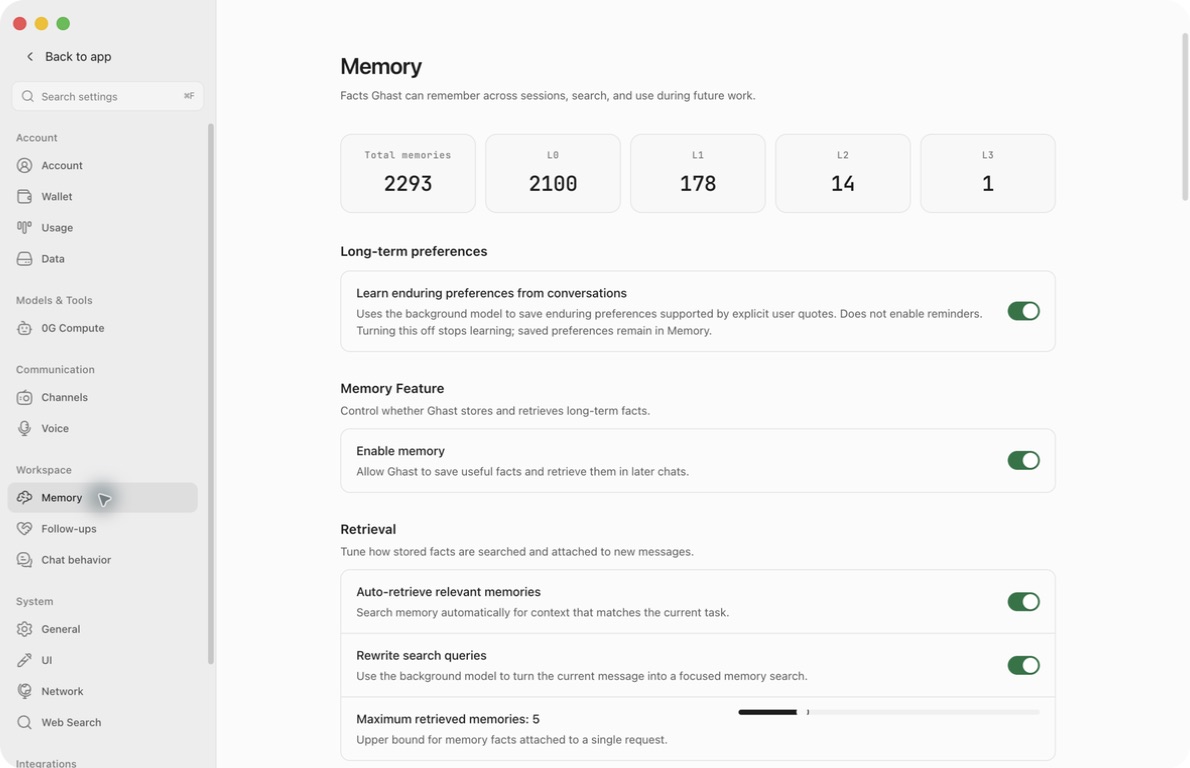
Set up and save
- Turn on Enable memory.
- Turn on Auto-retrieve relevant memories if you want related facts added to new requests.
- Choose whether to allow Auto-summarize conversations and Learn enduring preferences from conversations. They control different kinds of saving.
- Review Memory Background Model. Choose a configured model if you do not want to use the default background model; use Test to check its availability.
- Click Save at the bottom. Reopen Memory and check your selections.
- Use Search Memories to check a known fact, then try a small task that should use it. A successful model test alone does not prove that a fact was saved or retrieved.
All seven configuration controls on this page are drafts until Save. Close asks whether to discard unsaved changes: Cancel keeps the draft open; confirming discards it.
Search, model testing, and record operations work differently: they run when you invoke them. Discarding Settings does not undo a saved record edit or deletion.
Enable or pause Memory
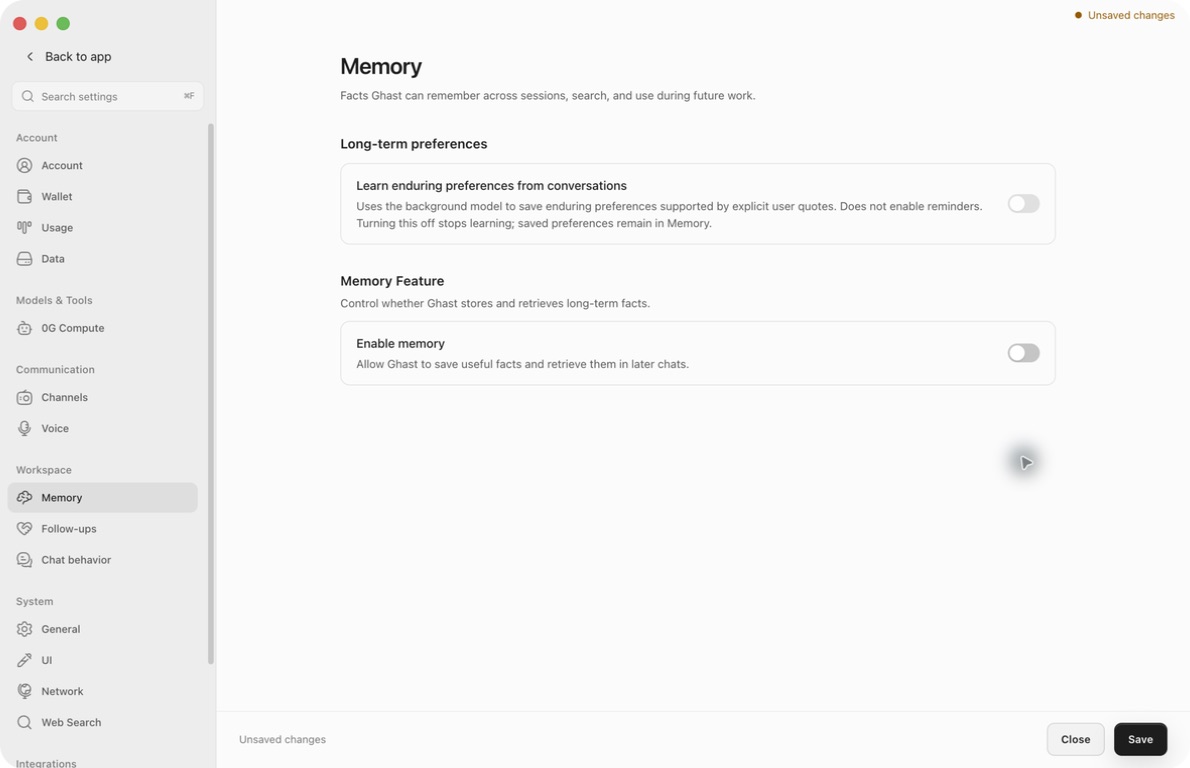
Enable memory controls ordinary Memory storage and retrieval. Turning it off does not delete existing records.
The page responds to the draft immediately: statistics, retrieval options, summarization, model selection, search, and the record list disappear. Preference learning becomes disabled and appears off. This is a change to the visible form, not proof that the saved configuration has changed. Click Save to apply the setting.
Turning Memory back on reveals the controls and retained records again. Disabling Memory alone does not erase the stored preference-learning choice.
Automatic retrieval
Auto-retrieve relevant memories
Enable this to let Ghast look for facts relevant to a new request. Disable it to stop automatic retrieval without deleting stored facts. With Memory still enabled, you can continue using Search Memories manually.
When this switch is off, query rewriting and the retrieval-limit slider are hidden, not reset.
Rewrite search queries
This allows the background model to turn a manual Settings-page query into a more focused search. It can send your query text to that model's provider. Turn it off before searching if you do not want this model-based rewrite.
For a manual search, the switch's current draft value is used immediately, but the model is resolved from saved background-model settings. Save a newly selected model before using Search to evaluate it.
Ordinary Chat and Coding automatic Main Memory retrieval does not use this model rewrite. The switch is not a promise that every retrieval request invokes a rewriting model.
Maximum retrieved memories
Move the slider between 1 and 20, in steps of one. This controls relevant-fact retrieval, not the total amount of Memory context.
Main Memory L1 is additionally capped at five facts. L2/L3 and Knowledge may be attached separately, so this is neither a token budget nor a total count of everything included. Settings-page manual search has its own limit of ten results.
What Ghast learns and saves
Auto-summarize conversations
Allows eligible conversation context to be extracted into compact facts. Memory must be enabled, the conversation must permit capture, and a working background model must be available. Not every exchange creates a record.
Incognito conversations, internal side channels, heartbeats, and conversations with capture disabled are excluded from ordinary capture. If a fact matters, verify it in Search or Recent Memories; there may be no separate notice when extraction fails or finds nothing suitable.
Learn enduring preferences from conversations
Allows a separate review of explicit user wording for durable working and communication preferences. Turning it off stops new preference learning but preserves saved preferences. It does not enable reminders or Follow-ups.
To remove a previously learned preference, correct or delete its record rather than only switching learning off. See Manage Memory.
Choose the Memory Background Model
This model handles Memory query rewriting and extraction. It is separate from the model you choose to answer a chat.
- Open the model selector.
- Search by model name, model ID, or provider name.
- Choose a model from an enabled, configured provider.
- Click Test. Testing runs immediately against the selected model; it does not save the choice or prove Memory extraction works.
- Click Save to apply the selection.
If no Memory-specific model is selected, Ghast uses the general background-model configuration. An auto-detected label is not proof that the provider is authenticated, funded, or reachable. If you have an explicit choice, Use default clears that override; save afterward.
The test result is temporary and clears when the selection changes. A test failure should be resolved through provider setup before relying on background extraction.
Existing records and deletion
The counters describe Main Memory across L0–L3. Recent Memories lists only L1; Search covers L0 and L1. Team teammate and group records have their own management surfaces.
Clear all is not limited to the visible list. It clears Main Memory and deletes L1 records across Team teammate and Group scopes. Team/Group L0, L2, L3, and Knowledge remain. Read the full deletion scope and backup limits before using it.