Use plugin Hooks
Some plugins supply instructions automatically when you start a conversation, send a message, or launch a subagent. They use lifecycle Hooks: local commands that Ghast runs at those points, without requiring you to select a Tool for each invocation.
For example, a development plugin can load its review rules at the beginning of a session and refresh them after automatic compaction before a request. The plugin's own commands may let you choose a mode for that conversation.
Check a plugin before using it
- Open Chat or Coding, then select Plugins in the left sidebar.
- Search for the plugin and open its details.
- Look for Lifecycle hooks and read its description and setup requirements.
- Check Information for its author, version, source, and installed status.
- Open its Source repository or Documentation, when provided. Before installation, review the Hook commands and any scripts they launch.
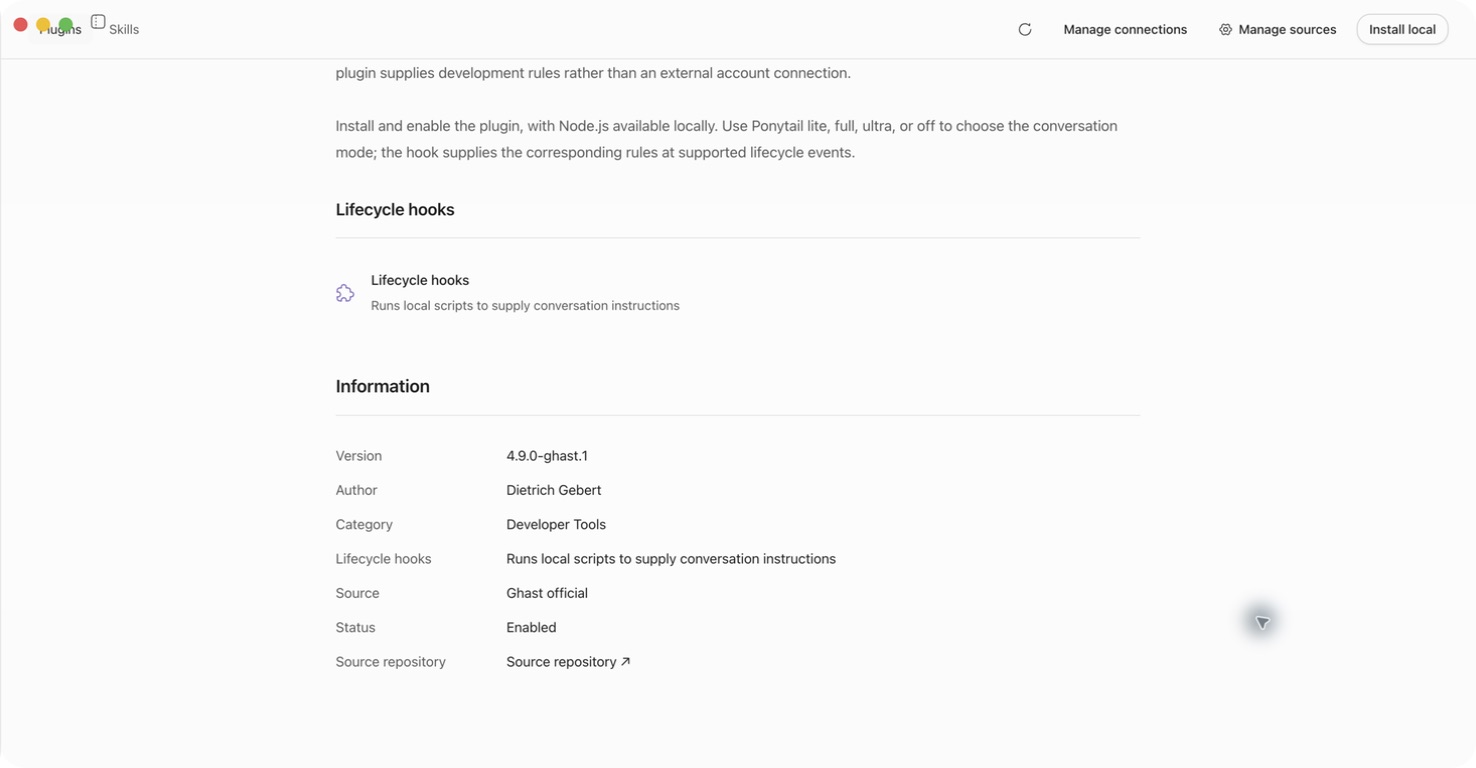
Details does not enumerate every command or trigger. Absence of this description is not proof that a local package has no Hooks. Ask the publisher for its configuration and scripts if you cannot inspect them.
Start using a Hook-enabled plugin
- Review the package and follow the plugin installation guide. New installations are enabled automatically.
- Open the installed plugin's details and confirm Status → Enabled. If it is disabled and offers Enable, select that control.
- Complete its prerequisites, such as installing a required command-line runtime.
- Select Try now or a starter prompt when available. Ghast opens a conversation with a draft; inspect it before sending.
- Send a small, non-sensitive request that exercises the plugin's documented behavior. Check the response and any error before using it for important work.
Hooks follow the enabled plugin and their matching events, not a composer tool selection. An enabled plugin's matching Hooks can run even without an @plugin mention. Mentioning a different plugin or switching off an individual Skill does not stop these commands.
A Hook can supply instructions without producing a separate tool-call card. The model saying that a Hook ran is not a reliable execution check. Custom-plugin authors should use the local test procedure to verify their command and output.
When Hooks run
| Event | What the plugin can do |
|---|---|
| Each conversation's first generation request, including its first request after restarting Ghast or reloading the plugin | Supply instructions reused for that session |
| Ghast automatically compacts context before a request | Rebuild session instructions |
| A new user prompt is submitted | Supply instructions for that prompt |
| A subagent starts | Supply guidance to a supported delegated task |
Reopening an existing conversation does not itself run SessionStart again. Manually compacting a conversation does not refresh its SessionStart instructions in this version.
The plugin selects which events apply. These are conversation lifecycle events, not timers. For work that should run later, see Follow-ups.
These Hooks do not offer a per-Tool interception rule. For tool access and approval, use permissions.
Stop a plugin's Hooks
First check whether the plugin documents its own off command or setting. Such a mode can stop it from supplying instructions, but its Hook command may still run to read that mode.
To stop the plugin's Hooks themselves:
- Finish or stop work that depends on the plugin.
- Open Plugins → Installed and select the plugin.
- Choose Remove, if available, and verify the name in the confirmation dialog.
- Confirm removal.
- Start a new conversation before testing without the plugin. Existing conversation history can retain earlier messages and instructions.
This version does not provide a plugin-wide Disable button for an enabled plugin. Enable appears only for an already-disabled, manageable plugin. Some system plugins cannot be removed.
Removal stops future Hook execution; it does not undo file changes or information already sent elsewhere. External-account disconnection is separate. Check for shared authorizations before disconnecting a service; see Manage installed plugins.
Understand the permission boundary
A Hook runs with your operating-system account's access. It can read or change files, start programs, and contact the network without going through Ghast's Tool selection or command-approval prompt. Ask mode is not a sandbox for Hook scripts.
Hook input can contain your message and working-directory path. Scripts inherit most of Ghast's process environment. Their output may be included in the request sent to your selected model provider.
Install only code you trust. Review updates for new network requests, file writes, or credentials handling. Never put secrets in output merely because it does not appear as a chat message. Instructions returned by a Hook do not grant the model extra Tools or account permissions.
Resolve problems
- A Hook blocks a request: read the reason and check the plugin's documented prerequisite. Do not bypass a deliberate policy check just to force an operation through.
- Instructions are missing: confirm Enabled, required runtimes, and the plugin's own mode. Try a new conversation. Authors should also check the event and output format.
- Sending becomes slow: a Hook may be waiting on a command or network call. Each command has a maximum timeout of 30 seconds; several commands can run in sequence.
- A removed plugin still seems active: test in a new conversation. Removal cannot erase earlier messages, responses, or files.
- The problem persists: collect the plugin name, version, error text, and reproduction steps. Remove secrets and private messages before sharing diagnostics.
To create your own package, continue with Write a plugin Hook.