Fund the inference account
After 0G Compute is configured, confirm that the inference account has usable funds. Open Settings → 0G Compute and review Account funds. If existing Credit or another balance already supports a model test, you can skip payment for now; otherwise choose a funding method. Crypto funding also requires a local wallet under Account and Wallet.
Wallet balance is not inference balance
Ghast shows two separate kinds of funds:
| Location | What it shows | Used for |
|---|---|---|
| Settings → Wallet | Native tokens, Tokens, and transactions for the local wallet on supported chains | Paying transactions, supplying a top-up, and local signing |
| Settings → 0G Compute → Account funds | Credit, Payment Layer, and Router Deposit held for the 0G Router account | Paying for model inference |
Tokens in the wallet do not mean the model account has spendable funds. A successful source-chain transaction does not by itself prove that the Router credited the account. Refresh Account funds after a top-up.
Read Account funds
| Field | Meaning |
|---|---|
| Total (0G) | The total currently reported by the account service. Ghast does not calculate this field by adding the visible cards. |
| Credit | Account credit, including eligible redeemed rewards. |
| Payment Layer | Payment-layer funds and the balance watched by automatic funding. |
| Router Deposit | Funds deposited into the Router. |
The refresh button reloads account state. If a value is —, remains stale, or reports an error, check the Management Key and network before attempting another payment.
Choose a funding method
Select Top up. The live client offers Crypto, Card, and Exchange; availability is authoritative on the current screen.
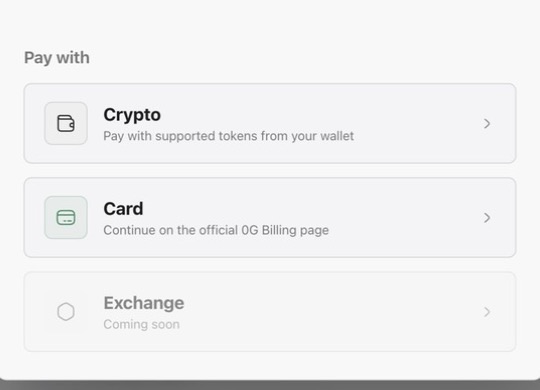
Crypto: fund from the local wallet
Crypto uses a supported token held by the local wallet and credits the Payment Layer through 0G Pay.
- Confirm the address under Settings → Wallet is the wallet you intend to use.
- Open Settings → 0G Compute → Top up → Crypto.
- Choose a payment token. The selector filters by chain and shows balances discovered for the local wallet. The live list determines supported chains and tokens.
- Enter the amount. MAX fills the amount from the selected token's current balance.
- Before the final action, verify the source chain, token, amount, wallet address, and destination Payment Layer.
- Select Top up with 0G Pay and wait for the submission result.
- Close the dialog, refresh Account funds, and confirm that Payment Layer or Total changed as expected.
The current Crypto flow has no separate quote-review page. After the final click, Ghast requests a quote from 0G Pay, signs the returned transactions locally, and submits them directly. If the outcome is unknown, do not click again. Inspect the message, wallet transaction history, and Router account funds first.
The private key is not sent to 0G Pay. Source chain, token, amount, and wallet address are sent to the relevant services for quoting and balance discovery; signing remains local.
Card: continue on the official 0G Billing page
Card opens 0G Billing in the external browser. Payment methods, currency, regional restrictions, fees, and settlement timing are controlled by that page.
After payment, return to Ghast and refresh Account funds. If the browser reports success but Ghast has not updated, wait and refresh before paying again.
Exchange: not available yet
Exchange cannot be used while the entry says Coming soon. A disabled entry does not mean direct exchange funding is already supported.
Redeem credit
If you have a Ghast credit-reward code:
- Select Redeem credit.
- Enter the
GCR-...code. - Redeem it and wait for the result.
Redemption requires a bound wallet, and each account can redeem once. The current reward is 10 0G. A result can be fulfilled immediately or remain pending. Pending is not failure; refresh Account funds before retrying.
Optional: Auto top-up
Auto top-up uses a selected chain and token from the local wallet when Payment Layer falls below a threshold. It is not a continuous real-time debit.
Configure:
- a minimum Payment Layer balance, currently no lower than
0.1 0G; - an amount per top-up, default
1 0Gfor a new rule; the unit changes with the selected payment token; - a maximum execution count, default
3for a new rule; and - the source chain, payment token, and local wallet.
A rule can be paused, resumed, or deleted. Low wallet balance or an exhausted count pauses it, and a failed run records a failure. With no Management Key, Ghast skips the check while the rule may still appear enabled, and no Activity Log event is added.
For a first setup, complete one small manual top-up before enabling Auto top-up. That verifies the wallet, chain, account, and model path before automation.
Completion check
After funding:
- Select Refresh under Settings → 0G Compute.
- Confirm the expected change in Total, Credit, Payment Layer, or Router Deposit.
- Do not rely only on the wallet's transaction-success state.
- Continue to Enable, test, and select models.
For complete key, auto-top-up, and error behavior, see 0G Compute settings.