Message actions and task recovery
Hover over a message and open More actions. Available items depend on the message type, run state, and whether a file snapshot exists.
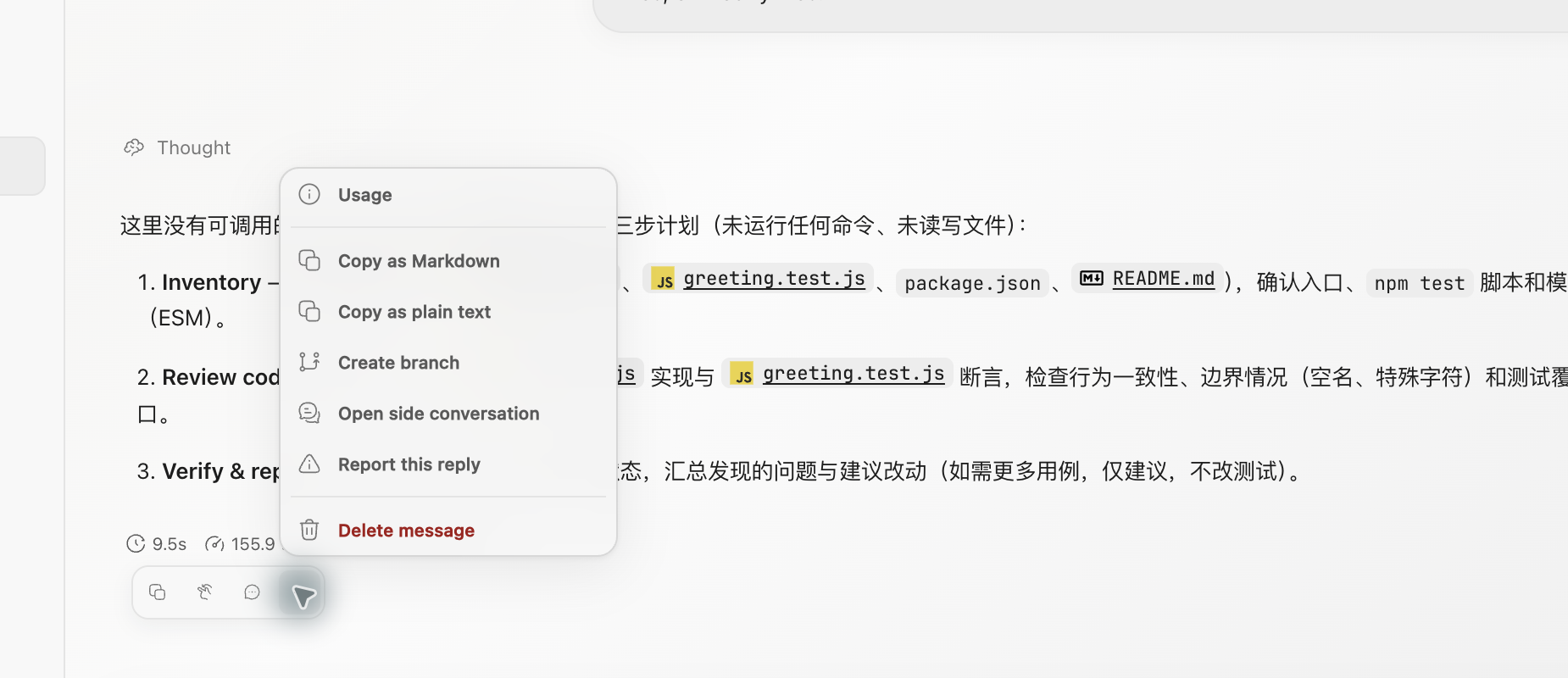
Common message actions
| Action | Result |
|---|---|
| Copy Markdown | Copy the message with Markdown syntax preserved |
| Copy plain text | Copy the words without formatting |
| Usage | Inspect available token and cache usage for the response |
| Open side conversation | Create a read-only reference snapshot and open parallel Q&A |
| Create branch | Start a new Ghast conversation branch at the selected message |
| Report | Open the feedback flow; review sensitive content before sending |
| Delete message | Immediately delete that one message |
Delete a message
Delete message has no second confirmation. If the conversation is generating, Ghast stops the generation first and then deletes the selected message. It does not restore files, undo commands, or remove later messages.
Use Rollback when task state must be restored. Delete a message only when the text record itself is no longer needed.
Roll back file changes from a message
When a message has an associated snapshot, its menu includes Rollback. The dialog offers two scopes:
- Files only restores workspace files to that snapshot and keeps later messages;
- Files and messages restores the files and deletes messages after the rollback point.
Rollback covers only file state managed by the snapshot. It does not reverse network requests, remote commits, database writes, sent messages, installations, or running processes. Inspect uncommitted changes first, then check Git, Terminal, and affected external systems afterward.
Create a conversation branch
Create branch copies history from the beginning of the conversation through the selected message and opens a new session in the same workspace. This is a Ghast conversation branch, not a Git branch. Later messages are independent, but both sessions can still edit the same directory.
The new branch keeps session details such as coding mode, but command approval returns to the new coding-session default of Full access. Recheck the workspace, Tools, Skills, model, and permission before sending.
Recover an interrupted run
An interrupted execution summary can show Retry interrupted turn. A recoverable task can also show Resume as new run. Both create a new run; neither resumes the old process at its previous instruction pointer.
Before selecting either action, check the composer queue. Remove pending instructions you no longer want, and make sure another queued run has not already started. Recovery and queue sending are different actions; see Stop without starting another queued task.
Then inspect:
- Files and Git for partial changes from the earlier run.
- Terminal processes, development servers, and installers that may still be active.
- External requests, remote objects, or messages that may already exist.
- The workspace and authorization for the new run.
When the previous run may have produced side effects, tell the agent the observed state and start the new run by verifying it.