Workspace panel
Select Open workspace panel beside the conversation title, then use New tab to add a view. The conversation and project tools stay side by side, so you can discuss a task while checking files, commands, a page, or Git.
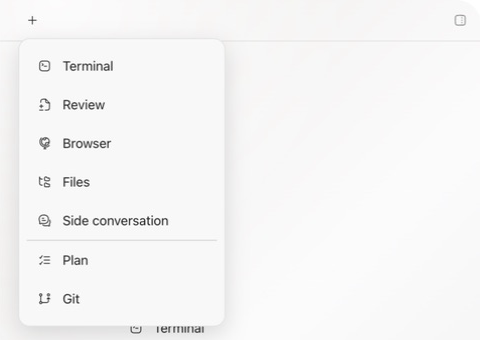
Seven panels
| Panel | Use it for | Check before completion |
|---|---|---|
| Terminal | Create, observe, or take over workspace terminals | Directory, process, and exit state |
| Review | Accept, reject, undo, or reapply captured file changes | Compare with inline diff and Git state |
| Browser | Open local or web pages and select a page element | URL, page state, and sensitive content |
| Files | Browse directories, preview files, and use file actions | Full path, type, and content; UTF-8 / LF are fixed labels, not detected metadata |
| Side conversation | Ask a related question without Tools | Send any accepted conclusion back to the main task |
| Plan | Show the latest usable TodoWrite steps found in the conversation | An empty panel means the conversation has no usable TodoWrite data |
| Git | Manage branches, changes, commits, stashes, history, and conditional PR flow | Check the branch and files before a write action |
Manage tabs
- New tab adds a view; it does not run a command or modify Git.
- Keep several tabs open and select a tab name to switch.
- Drag the divider to resize conversation and panel widths.
- A tab’s close control closes the view, not files, terminals, or conversation history.
- Close workspace panel returns full conversation width; reopen it beside the title.
Terminal, Review, Browser, Files, and Side conversation appear as common work views above the menu separator. Plan and Git are task-tracking and version-control views below it. Availability depends on the current conversation, workspace type, and data already produced.
When a panel is empty
An empty view normally means only that this panel has no matching data:
- empty Review is not a clean Git worktree;
- empty Plan means the conversation has no usable TodoWrite data; a numbered list does not populate it;
- unavailable Git usually means the workspace is not a Git repository;
- empty Files or Terminal should prompt a check of the session’s workspace;
- Side conversation opens the active parallel conversation and should be created from a main message first.
Use Refresh when available, then choose the view that best represents the state you need. The following pages document each panel in detail.