Complete a coding task
This page uses an issue already covered by a test to show a complete Coding workflow. Use the same sequence for feature work, refactoring, or documentation.
1. Inspect project state
Open the project and create a coding session. In Git, record the current branch and staged and unstaged files. Existing changes belong to the project and must not be overwritten by default. Then hover over the workspace folder in the session header, check its complete path, and confirm that it is the directory you intend to change.
2. Send a bounded task
Outcome: Reproduce the current failure and fix its root cause.
Scope: Change implementation files only and preserve existing uncommitted work.
Constraints: Do not modify tests, add or upgrade dependencies, commit, or push.
Done when: Run the relevant test before the change and again afterward; report the cause, changed files, result, and anything not checked.
Add known commands, reproduction steps, and expected output. For a UI issue, Add → Capture app context attaches the target app state. Review the attached content before sending.
3. Check run controls
Before sending, confirm:
- the workspace path belongs to the target project;
- attachments and app context contain only what the task needs;
- command authorization matches the risk—a new session currently defaults to Full access;
- the model supports the required Tool calls;
- the request states allowed files and actions, including any network restriction.
In stable 0.1.33, the Coding Add menu exposes attachments, Capture app context, and New chat in workspace. It does not provide Tools/Skills checkboxes or an “all tools off” switch. Ask asks before high-risk shell commands; it does not disable every Tool or guarantee that no files can be changed. A written restriction is a task instruction, not a technical permission boundary.
4. Watch investigation and editing
Ghast shows files read, commands run, files edited, and Tool state in the conversation. Expand cards to inspect their target, parameters, output, and exit state.
For a bug fix, the failure before editing is a useful reproduction result. Let the run proceed into diagnosis. Select Stop generating if it reads an unrelated directory, edits an out-of-scope file, or starts an unauthorized action. Then inspect files and processes before deciding how to continue.
5. Review changes
Open the Edited file card for an inline diff, or use the 1 file changed → Review summary below the reply (the count varies with the run). Use the workspace Files and Git views to inspect current state.
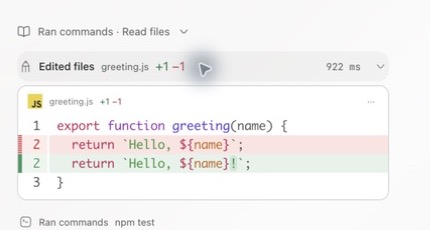
Confirm that:
- Only allowed files changed.
- Pre-existing uncommitted work remains.
- No lockfile, generated output, or secret appeared unexpectedly.
- The implementation addresses the cause rather than hiding the symptom.
6. Check the result
Expand the post-change command card. Confirm that it ran against current files, reached an end state, and reports the relevant output and exit status. For UI work, refresh the same Browser path and repeat the user flow. For an external system, inspect that system separately.
Reproduce the stable-version example
Verified on 2026-10-19: Ghast AI stable 0.1.33 (build 0.1.33.46), macOS 27.0.1 on Apple silicon, MiniMax-M3 / High, command authorization Ask. Python 3 was already installed and the selected model/account was usable. Windows, Intel Mac, other models, and local coding agents were not tested in this example. The existing illustrations on this page are retained; use the version-specific control names in the text.
Create an empty coding-example folder containing these two files. This is a small arithmetic example, not a money or billing implementation.
total.py (intentionally incorrect):
def total(items):
    return sum(price for price, quantity in items)
test_total.py:
import unittest
from total import total

class TotalTests(unittest.TestCase):
    def test_quantities(self):
        self.assertEqual(total([(12.5, 2), (5, 3)]), 40)

    def test_empty(self):
        self.assertEqual(total([]), 0)

if __name__ == "__main__":
    unittest.main()
Follow Add a project and start a session, select this folder, and create a session under it. Check the full workspace path, select an available model, and choose Ask before sending:
In this coding-example workspace only: run python3 -m unittest -v to reproduce
 the failure, inspect total.py and test_total.py, fix only total.py so unit
 price is multiplied by quantity, then rerun the same tests. Do not modify
 tests or README, install dependencies, use the network, commit or push.
 Report the before/after test output, changed file and the cause.
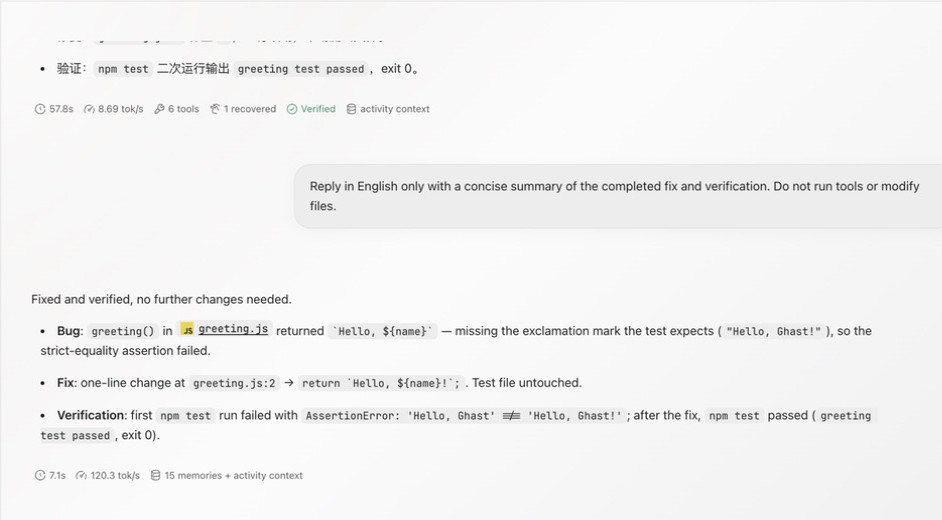
The stable-client run showed test_quantities failing with 17.5 != 40 and exit 1. The Agent changed only the return expression to sum(price * quantity for price, quantity in items). The next command card showed both tests passing and OK; an independent local rerun also passed. The test file and README hashes stayed unchanged. Python can create __pycache__ while running tests; distinguish that generated cache from source edits.
Check the actual diff and command output rather than relying on Verified alone. If Python is missing, a model fails, or approval is pending, resolve that prerequisite before retrying; this example does not require a new dependency, an external account connection, a commit, or publication.
7. Decide whether to deliver
Only after review should you selectively stage files. Commit, push, and Pull Request creation are separate actions; they do not happen merely because the response says the task is complete. If delivery is deferred, keep the conversation and record remaining work.
A failure, stop, or disconnect does not mean earlier actions did not run. Before resending, inspect files, processes, dependencies, Git, and external objects to avoid duplicate changes or submissions.