Connect Feishu
Start Ghast tasks from Feishu direct messages or groups while Ghast runs on your computer. Open Settings → Channels → Feishu.
Prepare a usable provider, model and a narrowly scoped local workspace first. This connection uses Feishu's open.feishu.cn services; the current client has no Lark-region selector. Do not assume credentials from the international Lark platform are interchangeable.
Before connecting
Use a Feishu enterprise self-built app with bot capability, not a group custom-webhook bot. A webhook URL is not an App ID or App Secret.
Start with only a test user and a non-sensitive test group in the app's availability range. Ghast currently provides no Feishu user allowlist, group allowlist, pairing approval or mention-only switch. Restrict who can use the app in Feishu and which groups contain the bot before connecting your computer.
Feishu's long-connection mode requires internet access but no public IP, domain or tunnel. It supports enterprise self-built apps and includes transport authentication/encryption. Multiple clients using the same app receive distributed events rather than a full copy each; use one Ghast installation for the initial test. Feishu long-connection guide.
1. Create the app and prepare permissions
- Open the Feishu developer console.
- Create an enterprise self-built app and set its name and icon.
- Add or enable the Bot / 机器人 capability.
- Set the app's availability to the intended test users. Complete your organization's approval process where required.
- Under Credentials & Basic Information / 凭证与基础信息, copy the App ID and App Secret from that same app.
- Open Permissions / 权限管理 and configure the message and reply permissions below.
Permissions in Ghast's setup guide
The current client lists these six scopes:
| Scope | Why it appears in setup |
|---|---|
im:message | Message access |
im:message:send_as_bot | Send replies as the bot |
im:resource | Access message resources such as images and reply-file uploads |
im:message.group_msg | Receive users' group messages, including ordinary messages without a mention |
im:chat:readonly | Read chat information |
cardkit:card:write | Create and update streamed Markdown cards |
Also check the event's specific receive permissions. Feishu distinguishes direct-message access from group-message access. For direct messages, grant im:message.p2p_msg:readonly or the corresponding legacy im:message.p2p_msg permission available in your console. For user mentions in groups, Feishu lists im:message.group_at_msg:readonly or im:message.group_at_msg; receiving all user messages uses im:message.group_msg. A broad-looking message scope is not a substitute for checking which events the installed app can receive. Receive-message permission requirements.
Granting all-group-message access expands what reaches Ghast. If your intended use is only explicitly mentioned group messages, review the narrower mention permission with your administrator instead of blindly granting all-message access. Without ordinary-message delivery, Ghast cannot use those messages as group history or detect an unmentioned ghast name call.
Ghast ignores messages whose sender is another app. Do not request bot-to-bot message access merely to make this guide's normal user-message test work.
2. Enter credentials and start the local connection
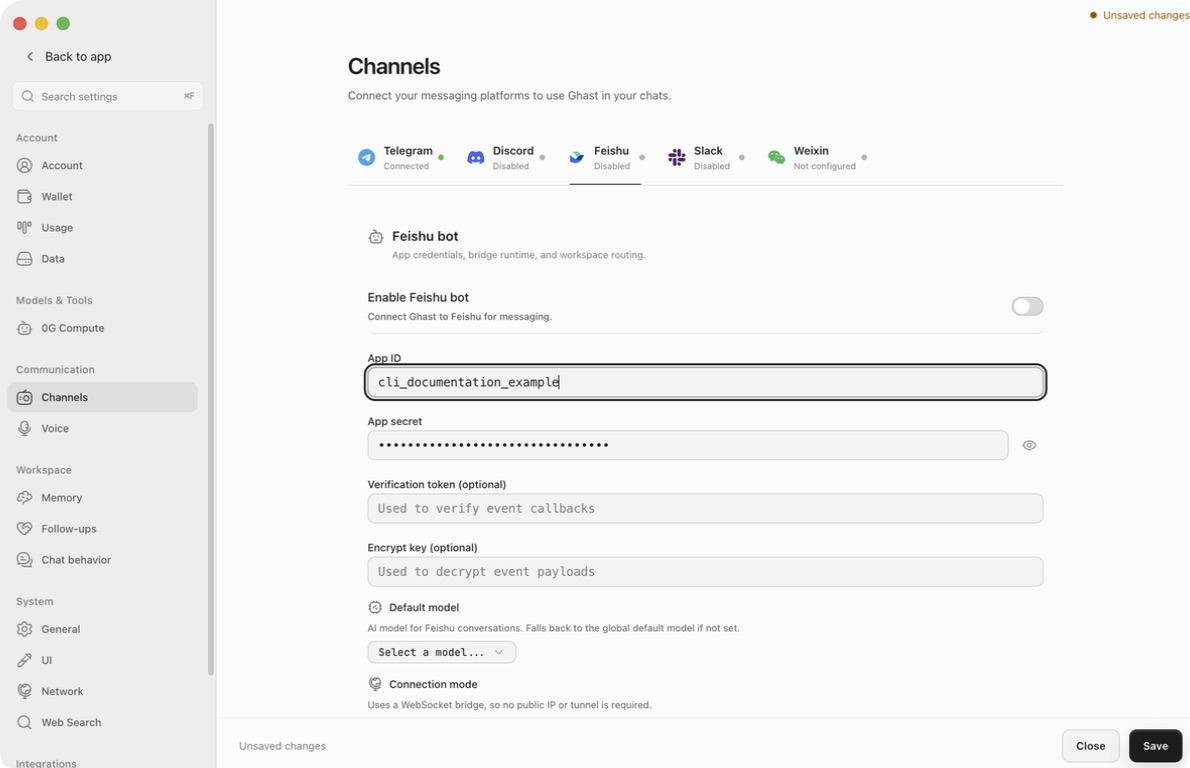
| Setting | How to use it |
|---|---|
| App ID | Paste the real app's ID, normally beginning with cli_. Do not paste a bot user ID, chat ID or webhook URL. |
| App secret | Paste the secret from the same app. The eye button reveals or masks it. |
| Verification token (optional) | Not required by Ghast's current long-connection flow; leave blank for this setup. |
| Encrypt key (optional) | Not required by the current long-connection flow; leave blank for this setup. |
| Default model | Choose the model to prefer for Feishu tasks. Configure its provider and enable it first. |
| Connection mode | Informational text: the client uses WebSocket. There is no HTTP/webhook mode selector. |
| Enable Feishu bot | Enable after reviewing the app's exposure and local workspace, then click Save. |
The optional callback fields are visible in the client, but they do not configure an HTTP callback server or add an independent access-control layer to this connection. They are ordinary visible text fields, unlike the masked App Secret; do not put secrets in screenshots.
App ID and App Secret must both be nonempty to turn on a disabled bot. That UI check is not authentication. There is no Verify credentials or Send test message button on this page.
Changes to credentials, enablement, model and workspace bindings require Save. Switching platform tabs does not save. To discard, use the footer Close and confirm closing without saving. Save applies the settings draft, not only the part of it currently on screen.
Saving changed Feishu settings restarts the connection, even when only the model or workspace mapping changes. Let important tasks finish before doing this. Do not infer that a successful save proves authentication, event delivery or model generation.
Feishu requires an online long-connection client before it will save that subscription method. Enter the real App ID/Secret, choose the model and workspace, enable and save in Ghast, and keep Ghast running while completing the next step. Keep the app's test availability narrow during setup.
3. Subscribe to messages and publish
- With Ghast running, open the app's Events & Callbacks / 事件与回调.
- Edit the event subscription method and select Receive events through a long connection / 使用长连接接收事件.
- Save that method. If Feishu says no connection is online, check Ghast's Bot log and credentials; an empty webhook URL is not the fix.
- Add Receive message / 接收消息, event key
im.message.receive_v1. - Verify the relevant direct/group-message receive permissions, not just the event name.
- Under Version Management & Release / 版本管理与发布, create and submit the app version, complete approval and publish it. Confirm the test users are in the released app's availability range.
- After later permission or subscription changes, release the updated version as required by the console; do not test only the unpublished draft.
The client already supplies the long-connection implementation; you do not need to write an SDK program or expose a development-server port. The required order is documented in Feishu's connection setup.
4. Choose the model and workspace
Model priority
An explicit Feishu default model takes priority over an existing conversation's stored model. Without it, Ghast uses the existing conversation's model, then Chat's default. Selecting a model here does not enable it, supply provider credit or repair an expired login.
If the picker is empty, first check the enabled provider and its authentication in model setup. If a saved selection no longer works, choose another usable model and save before retrying the Feishu task.
Route a chat to a local workspace
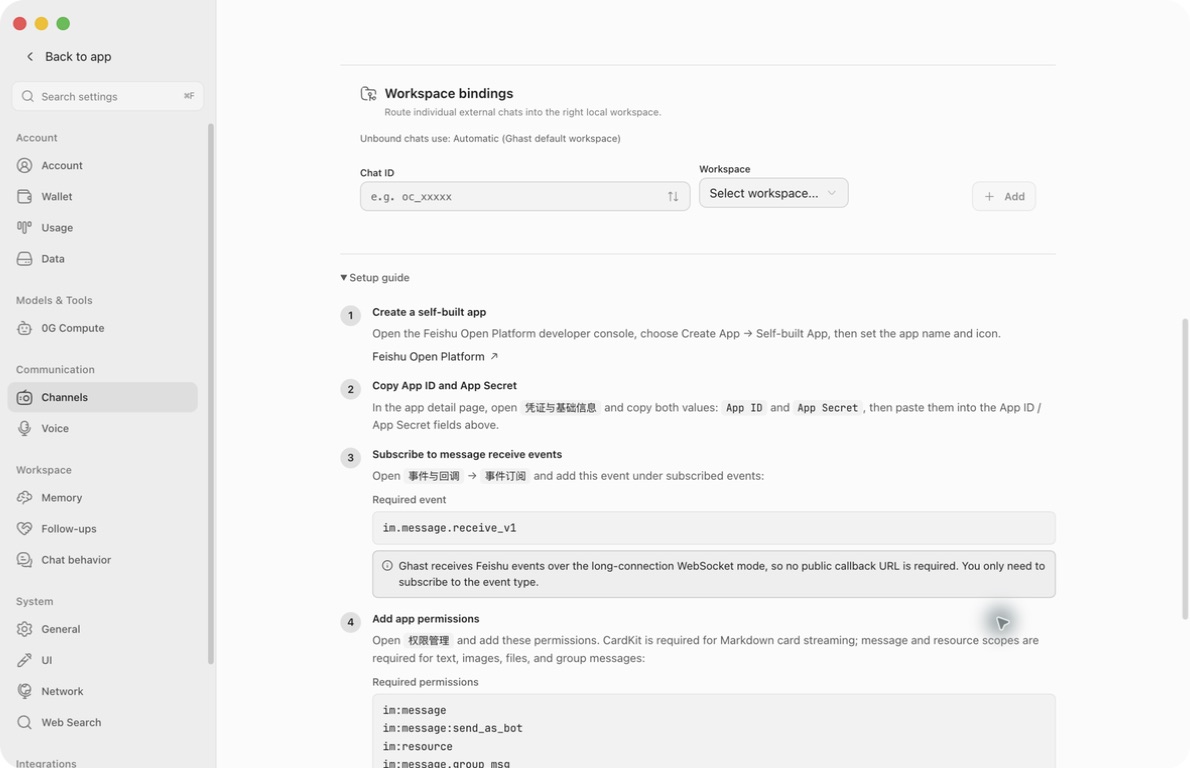
Under Workspace bindings:
- Choose a known Chat ID, or enter one manually. Feishu chat IDs use the
oc_form; use the chat ID, not anou_sender Open ID or anom_message ID. - Select a non-temporary local Workspace.
- Click Add. Both selections are required.
- Verify the new mapping row and click Save.
- To change a mapping, remove the row and add it again with the desired Workspace, then save.
The known-chat picker contains chats Ghast has already recorded; it is not a directory of every group in your organization. For a missing ID, ask your app administrator to inspect the receive event's message.chat_id, or check the relevant Bot log after a controlled test message. Do not invent an ID from the group name or paste an entire invite link.
A valid explicit binding wins, followed by General → Default workspace, followed by Ghast's automatic default workspace. The Unbound chats use line shows the configured fallback.
Unlike Slack, an existing Feishu conversation is moved to the currently resolved workspace on its next accepted message. Changing a binding therefore affects more than brand-new conversations. Verify the selected workspace before requesting file access; it does not isolate or erase earlier conversation context.
A binding is routing, not an allowlist. An unbound chat can still reach the fallback workspace. Keep both the explicit and fallback workspaces limited to data you intend this bot to access.
5. Test a private message, then a group
- Confirm the app is published and available to your test user, and Ghast is still running.
- Find the bot in Feishu and open a direct conversation.
- Send: “Reply only with
feishu-ready-47.” - Confirm the exact reply appears in Feishu. A local Ghast answer or a Running badge is not sufficient.
- Send a second message asking which string it returned. Check that the private conversation continues.
- Add the bot to a non-sensitive test group using the group's bot controls.
- Use Feishu's @mention picker to mention the actual bot and request another unique short reply.
- Inspect both the reply/thread view and the main group conversation. Test pictures and output files separately after text works.
There is no extra Ghast pairing code or allow-user approval screen for this connection. A failure to receive should be investigated through Feishu availability, membership, permissions and events.
Group triggers and privacy
| Message delivered to Ghast | Current behavior |
|---|---|
| A user's direct message | Enters the normal task workflow |
| Group message @mentioning the bot | Starts a task |
Group text containing ghast, case-insensitively | Starts a task even without a real @mention |
| Group message without either trigger | Stored in recent group history, then skipped as an immediate task |
| App-authored message | Ignored as an incoming task |
| Reply to an older group message, without a trigger | Replying alone does not bypass the trigger check |
Use the actual @mention to avoid relying on name matching. Ghast also recognizes the display name Ghast in mention metadata, so do not treat the trigger as a strong identity or authorization check.
Group images and images inside rich posts may be downloaded before the trigger decision. Ordinary delivered group text can later enter the context of a triggered task. “The bot did not reply” does not mean “Ghast did not receive or retain this content.”
Control sensitive exposure in Feishu: app availability, group membership and event permissions. Removing all-message access narrows what Feishu sends; merely avoiding the word ghast does not protect messages already delivered to Ghast.
Conversations, replies and commands
- Direct messages map by chat and sender. Successive top-level DMs normally continue the same mapped conversation.
- Group participants share a group-level Ghast conversation. Separate replies or topics do not create independent task or workspace boundaries.
- When a new message arrives while that conversation is generating, Ghast creates a branch instead of holding it in a simple queue. Wait for completion if sequence matters.
- Quoted-message text can be included when available in recent local history. Do not assume the full old thread has been fetched.
- Text/card replies may be attached to the triggering message. Delivery fallback can post at the main chat level; reply placement is not context isolation.
- Local group history and sender-profile context can supplement the saved conversation. Restarting or disabling the connection does not erase those saved records.
Do not rely on remote slash commands
In this client version, ordinary incoming Feishu messages do not reliably reach the built-in command handling. Treat /new, /stop, /model and /help as unavailable for controlling the integration; they may be handled as ordinary model input instead.
Use Ghast's desktop controls to inspect or stop the active task and change the Feishu default model in Settings. A model saying “stopped” or “new conversation created” is not proof a control action happened. In particular, creating a new Feishu thread is not a supported way to reset the shared group context.
Images, files, audio and reply cards
| Input or output | What to expect |
|---|---|
| Incoming text | Passed to the conversation |
| Incoming image | Ghast attempts to download it and attach it to the model request; image understanding still depends on the model |
| Incoming rich-text post | Text and embedded images are extracted |
| Incoming ordinary file | Currently represented by a filename notice, such as [文件: report.pdf]; the file body is not automatically downloaded into the model request |
| Incoming audio/video and other message types | Currently represented by message-type notices; do not assume transcription or media understanding |
| Outgoing generated file/image | Can be uploaded and sent to the chat; this does not mean incoming files are equally supported |
If you need Ghast to read a document, provide it through a supported desktop attachment or an accessible file in the intended workspace. Seeing its filename in a reply does not prove the document was read.
CardKit enables streamed Markdown cards. If card creation is unavailable, Ghast can fall back to edited plain-text replies; text delivery may therefore work even when cards do not. Check cardkit:card:write and the published app version when cards are missing.
Streamed card content is capped at about 90,000 characters and the plain-text streaming path at about 4,000 characters; those paths can truncate rather than deliver the entire long answer. Request a concise reply and a result file for large outputs, and verify the file separately.
Output files and images are posted to the chat, not guaranteed to stay inside the text reply's thread. An upload failure can fall back to a filename notice. Confirm there is an actual downloadable attachment, not just “📎 filename”.
Ghast may also add a reaction before finishing a task. A reaction or a partially updated card does not prove task completion or successful final delivery.
Runtime status and logs
The Runtime status section appears when the Feishu enable setting is on and runtime information is available. It is absent on the disabled screenshots in this guide.
| Item | Meaning |
|---|---|
| Running | The local runtime is started. Feishu currently exposes runtime health, not a verified Connected state. |
| Start time | When this runtime started |
| Last event | Last received message-event activity; it can update even when the message is later ignored |
| Bot log | Credentials/authentication, long connection, incoming events, resource and send errors |
| Bridge log | Conversation/workspace/model routing and reply-generation handling |
A quiet Last event time is not by itself a failure. Conversely, Running is not enough to prove the published app can deliver a message. Use the first-reply test.
When available, logs open inline. The viewer reads the latest 200 lines by default; click Refresh for a new read and × to close. Switching between Bot and Bridge logs replaces the open panel. A disabled log button means the runtime has no corresponding path.
Logs can expose text, message/chat/user IDs, resource names and local paths. Share only the relevant redacted excerpt; keep App Secret and any optional callback values private.
Troubleshooting
| Symptom | Next action |
|---|---|
| Enable is unavailable | Fill both App ID and App Secret. Nonempty fields still need real authentication. |
| Feishu will not save long-connection mode | Start and save the Ghast connection first; keep it online while saving the subscription method. |
| Runtime is Running but there are no incoming events | Check im.message.receive_v1, release/approval, test-user availability and group membership. Avoid multiple clients on the same app during testing. |
| Group works but DM does not | Check the direct-message receive permission separately from group permissions. |
| DM works but group does not | Add the bot to that group, grant the applicable group-event permission, publish, and use a real @mention. |
| Unmentioned messages appear in context | All-message group permission delivers them and Ghast records them before its response decision. Narrow Feishu permissions or remove the bot from that group. |
| Verification Token/Encrypt Key did not fix connection | These fields are not used by the current long-connection flow. Check App ID/Secret, app type and network instead. |
| Only international Lark credentials are available | This client has Feishu endpoints and no region selector; do not assume that setup is supported. |
| Model error or no usable selection | Recheck provider enablement, authentication, model availability and credit; choose and save a usable Feishu default. |
| New binding changes an existing conversation | Expected: the next accepted message reapplies Feishu's current workspace routing. Check old context separately. |
/stop or /new gets a normal answer | Do not rely on remote commands in this version; use desktop task controls and inspect the actual state. |
| File is named but not read or downloadable | Incoming ordinary files are filename-only; an outgoing filename can also be an upload-failure fallback. Verify real file content/access. |
| Replies lack cards or are incomplete | Check CardKit permission and publication; distinguish card/text fallback and streaming-length caps. |
| Ghast finished, but Feishu has no final reply | Check the original reply and main chat, then Bot/Bridge logs for send errors. Do not repeatedly resend a task that could still be running. |
Disconnect or retire the app
Turn off Enable Feishu bot and click Save. This stops the connection, not the app's Feishu permissions, existing messages, local conversations or retained group history.
For permanent retirement, remove the bot from groups and disable/remove the app or revoke its credentials through the Feishu administration process. Review local conversation and memory data separately.