Channel settings
Path: Settings → Channels.
A Channel connects an external messaging platform to Ghast. Messages enter Ghast, pass through the current Model, Workspace, Tool, Skill, and permission boundary, and may return to the platform.
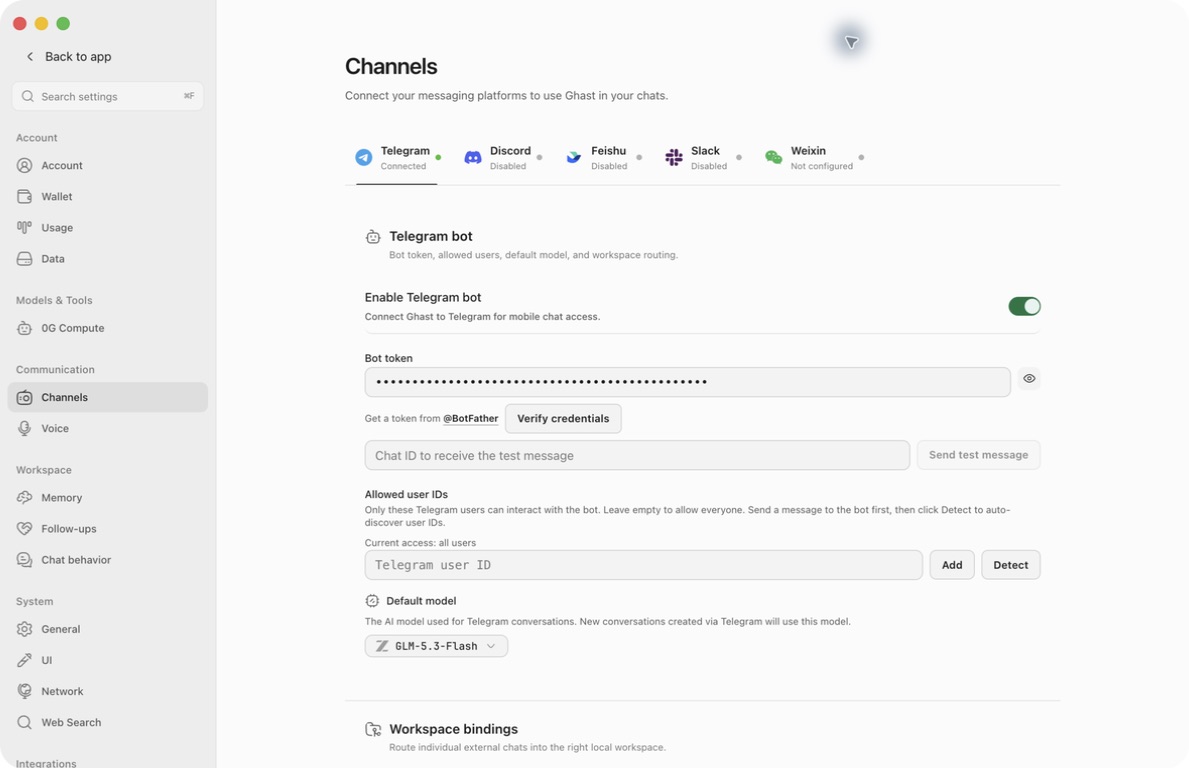
Common sequence
- Create or prepare the platform Bot/App.
- Enter the token, App ID, secret, or QR session.
- Restrict users, servers, or channels where the platform or Ghast provides an allowlist; review the exposure separately where no allowlist exists.
- Configure mention-only, groups, and default model.
- Enable, click Save, and wait for the runtime status to refresh. Switching platform tabs does not save edits.
- Send a short, non-sensitive test message.
- Check Bot Log, Bridge Log, or platform log.
- Bind the right Workspace and disable unused Channels.
An empty allowlist can have different semantics by platform. Read the page’s actual hint before saving. A Workspace binding selects the local directory for a message; do not assume it is an inbound allowlist.
Telegram
Follow Connect Telegram for token setup, the three different test/setup buttons, user IDs versus Chat IDs, models, workspaces, groups, commands and real-client screenshots.
Allowed user IDs restricts ordinary private messages, not group members. Empty means all private-chat senders can pass. Add IDs as chips and save; Detect only lists people already recorded locally and does not automatically allow them.
Group joining and Privacy Mode are BotFather settings, not separate Ghast controls. Do not disable Privacy Mode by default: it expands the group content Telegram delivers. Workspace bindings route chats but do not form a group allowlist.
Discord
Follow Connect Discord for the complete token, installation, ID, model, workspace, and first-reply procedure, with real-client screenshots.
Both lists are optional filters on server messages: an empty list does not restrict that dimension; when both are filled, both must match. They do not block direct messages. Add each ID as a chip and save. Threads require their own channel IDs.
Mention-only mode is not a privacy filter. Replies to the bot, text containing ghast, and commands can also trigger it; ordinary messages and attachments can be processed before the reply decision. Read the guide's trigger table and audio warning before adding the bot to a shared server.
Feishu
Follow Connect Feishu for the self-built app, App ID/Secret, long-connection setup order, separate DM/group receive permissions, publication, model and workspace controls.
Verification Token and Encrypt Key are visible optional fields but are not used by this long-connection flow. There is no Feishu allowlist or mention-only switch in Ghast. Runtime Running is not a verified connection; test actual receipt and delivery.
In a group, mentioning the bot triggers a reply; ordinary text also triggers when it contains ghast, case-insensitively. Group messages that do not trigger a reply are still stored in recent group history and can enter the model context of a later triggered task. “Not mentioned” therefore does not mean “not collected” or “excluded from future context.” Do not add the bot to a sensitive group whose messages should never enter model context.
Incoming ordinary files are currently filename notices, not automatic document reads. Review the guide's attachment and remote-command limits before relying on them.
Slack
Follow Connect Slack for both tokens, Socket Mode, all setup scopes and events, exact access rules, models, workspaces, threads, logs and real-client screenshots.
Slack's allowed-channel list also applies to DMs and group DMs. Mention-only exempts those message types from needing an @mention, not from the allowlist. Public/private-channel thread replies still need a new mention when the switch is on. Each top-level message starts a separate conversation; continue inside its thread to retain context.
Weixin
Follow Connect Weixin for QR authorization, Save versus immediate login actions, models, sender-to-workspace bindings, messages, audio, logs and real-client screenshots.
This is a QR-authorized bot connection, not a synchronization of all personal chats, contacts or groups. There is no client sender allowlist. Bindings only route conversations; an unbound sender whose messages reach this connection can still use the fallback workspace. Keep that workspace narrow. Showing a QR starts a real login flow even from an unsaved draft; discarding settings does not reliably cancel it. Do not share QR codes, login URLs or session data.
Platform differences
Markdown, attachments, message length, streaming, threads, mentions, retries, and deduplication vary by platform. A successful Chat view does not prove final external delivery; check the platform.