Self-improvement and Skill suggestions
Open Settings → Data and scroll to Self-improvement. Here you can control background learning and suggestions for reusable Skills. You do not need to tune Advanced diagnostics for ordinary use.
These controls are separate from main Memory settings and from the Self-improve category in Sync data. Selecting that sync category backs up learning data; it does not turn learning on.
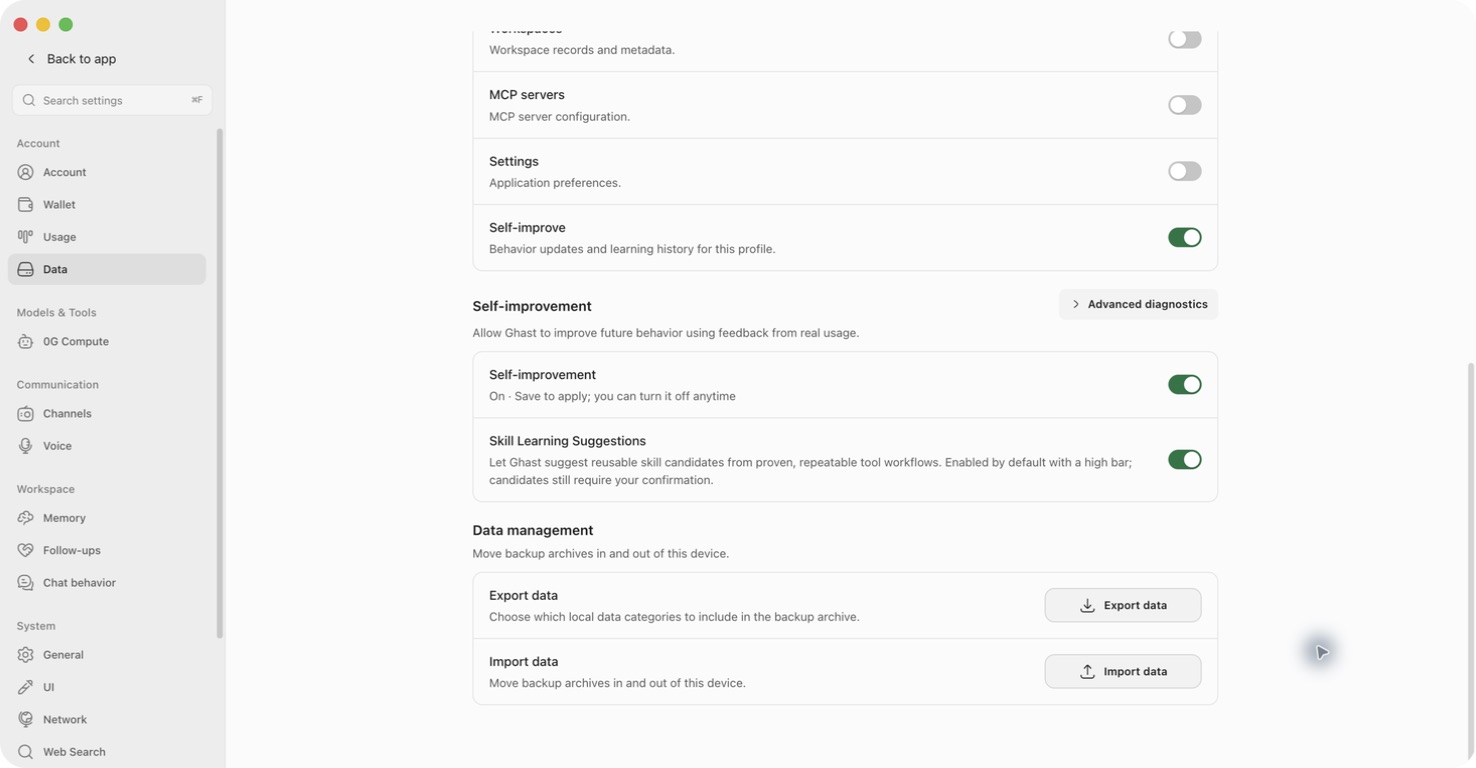
Choose what you want Ghast to learn
| Control | What it changes | What it does not do |
|---|---|---|
| Self-improvement | Allows learning from usage feedback and processing proposed behavior improvements. | Does not control Skill Learning Suggestions, erase stored learning history, or undo every previously applied change. |
| Skill Learning Suggestions | Allows Ghast to look for reusable workflows in eligible conversations and propose personal Skills. Both learning controls default to on. | Does not require a suggestion after every task, and does not disable existing Skills. |
| Self-improve under Sync data | Includes learning data in newly prepared 0G snapshots. | Does not enable or disable learning. See backup and sync. |
Turn a learning control on or off
- Open Settings → Data and find the Self-improvement section, not the similarly named sync category above it.
- Change Self-improvement, Skill Learning Suggestions, or both.
- Check Unsaved changes, then click Save at the bottom. The displayed switch is a draft until it is saved.
- Leave Data, reopen it, and check the saved values.
- To abandon a draft instead, choose Back to app and confirm closing without saving. This discards pending Settings edits, including any you made on other Settings pages; already executed actions are not undone.
Turning off only Self-improvement does not turn off Skill Learning Suggestions. Turn off both if you want to stop both background processes. This is not an instruction to cancel a run already in progress, and changing a switch is not proof that an already-started request was cancelled.
What remains after switching off?
- Stored learning records, proposals, feedback, and snapshots are not deleted.
- Applied Skills, remembered strategies, and some execution-rule changes are not automatically removed. Learned prompt adjustments stop being added through the Self-improvement feature, but the switch is not a universal return-to-defaults button.
- You can still submit explicit feedback; switching off background processing is not a ban on recording your deliberate feedback.
- Existing Skills remain managed in Plugins → Skills. Disable an individual Skill there if you no longer want Ghast to use it.
- An explicit task to create a Skill is different from an unsolicited suggestion and can still be handled with Skill Learning Suggestions off. This automatic extraction flow skips incognito conversations.
Importing Self-improve learning data is a separate restore operation that can replace the current device's learning data. Do not import an old backup merely to turn learning off.
Review a Skill suggestion in Chat
After an eligible completed conversation, Ghast may find a reusable workflow and show a Skill candidate card beneath an assistant reply. It is separate from the behavior-review inbox in Advanced diagnostics.
A model reply saying “I can make a Skill” is not this product card and does not prove that a Skill has been created.
- Read the candidate's name and short description. Check whether it describes a repeatable workflow you actually want to reuse.
- Choose Create to authorize generation and saving, or Ignore if you do not want this candidate.
- After Create, wait for the operation to finish. This can make another model request and may use inference funds; there is no general second confirmation before saving.
- When a saved-Skill result appears, open Plugins → Skills and find it by name.
- Read the full instructions and check the source, file location, enabled state, tools, and any external access it expects. Newly created personal Skills are enabled.
- If it is unsuitable, disable it before continuing to use Ghast; manage or uninstall it from its detail view.
The candidate card shows a summary, not a full proposed-file diff before Create. If that is insufficient to decide, ignore it or leave it pending. You can author a Skill when you need to control the exact instructions before enabling it.
Ignore removes the candidate from this confirmation flow; it does not delete the conversation or disable other Skills. The card has no undo action for Ignore.
Create, update, and retry are different
| Situation | Behavior |
|---|---|
| A new Skill is proposed | It waits for Create before generation and saving. |
| A personal Skill previously created by Ghast can be improved | Ghast may update it automatically without asking again for each revision. A snapshot is taken before an automatic update; this is not a user-facing undo guarantee. |
| The target is your own authored Skill, a built-in Skill, a plugin/project Skill, or another external source | This learning flow does not automatically overwrite it. |
| Create fails | The candidate may show a failure reason and Retry. Check the model, retained source conversation, and any conflicting Skill before retrying. |
| The source conversation segment is no longer available | Creation cannot reconstruct that candidate from its name alone. Keep the source messages until creation succeeds, or author the Skill manually. |
| A same-name Skill appeared after the suggestion | Creation can update a compatible Ghast-created personal Skill, or fail when the existing Skill is not an allowed update target. Check the library instead of assuming it will always create a separate item. |
A successful model response, a dismissed card, or clicking Create is not a saved-Skill receipt. Confirm the Skill in the library. After a request error, if the card gives no explanation, reopen the conversation and check the library before trying again.
Why no suggestion appeared
Ordinary analysis needs new tool-backed workflow evidence and a model judgment that the pattern is worth reusing. A simple text answer need not produce a candidate. Unfinished or cancelled turns, incognito conversations, unavailable models, and read-only Skill-name conflicts can also prevent a suggestion.
There is no guaranteed suggestion frequency or fixed tool-call count to meet. Do not create unnecessary tool calls to trigger learning. You can ask for a specific reusable Skill as a normal task, or write one yourself.
Review behavior proposals
Use Settings → Data → Self-improvement → Advanced diagnostics only when you want to inspect or manage proposed behavior changes. Several diagnostic labels remain Chinese even when the client is set to English; the names below match those labels.
- Expand Advanced diagnostics.
- Find 候选审批收件箱 (candidate review inbox) below the diagnostic controls. It lists proposals awaiting human review, not every learned change or every Chat Skill candidate.
- Inspect the candidate's type, target, date, short summary, judge verdict, and score.
- Click 展开 (expand) to see the prediction, safety score, and regression risk. A missing prediction or score is missing information, not an assurance of safety.
- Choose 批准 (approve) only if you understand and want the proposed change. Choose 拒绝 (reject) to decline it, or leave it pending if the summary is not enough to assess it.
- Wait for the row/list to update. If it stays pending, inspect any visible reason. Close and reopen Advanced diagnostics to reload the inbox when necessary.
Approve is an immediate action, not a draft waiting for Settings Save. It can change instructions or execution rules, create or modify a Skill, or add/update a remembered strategy. Reject is also immediate and has no second confirmation.
Reject marks the proposal declined and removes it from the pending inbox; it does not erase its history. The inbox has no undo or full-content/diff viewer for every proposal. Do not infer the complete change from a truncated summary.
Approval can still be blocked by disabled learning/review settings, model assessment, missing recovery information, or another change still under observation. A high score or a judge verdict of approve is not your approval and is not a promise that the action will succeed.
Do not rely on automatic rollback for every approved change. Some instruction and execution-rule changes have automatic checks and rollback; Skill and strategy-memory changes can instead return for human attention. Turning Self-improvement off is not the way to undo a particular approved item.
Understand Advanced diagnostics
These controls are optional diagnostics, not an onboarding checklist. Avoid enabling more processing just to make all status fields look active.
| Label in the client | How to use it |
|---|---|
| reviewInbox 总闸 | Enables the review-related processing path when Self-improvement is on. Change it only deliberately and click Save; opening the diagnostic panel does not enable it. |
| LLM 自主提案(proposer) | Allows additional model-generated proposals from observed failures when the other required checks permit it. Requires Save and can lead to additional model requests. |
| 解析后的闸门 | Displays effective processing states. These are status values, not more switches. Saved backend state can differ from an unsaved draft shown elsewhere on the page. |
| 偏好反馈 | Shows recorded feedback counts and the latest style-candidate status. A count is not proof that a preference has been applied to replies. |
| judge 模型设置 | Selects a dedicated model for assessing proposed changes. Click Save after choosing it. The adjacent Test makes a short model request; it is not a complete assessment or a save action. |
| 当前 judge 模型 | Shows the resolved assessment model. A dedicated selection takes priority; otherwise Ghast can use a saved Chat default model, then the Background Model. Check this displayed result instead of assuming it is your current conversation's model. |
| judge 校准 | Shows assessment-agreement information, its time, and version when available. It is not a percentage guarantee that Ghast's answers are correct. Missing or stale information does not mean the proposed change is safe. |
Normal use does not require running calibration or manually editing any internal setting. Additional developer-only controls are not required setup steps for the released client.
The candidate inbox reloads when opened and after a decision; the other diagnostic status rows are not a continuously updating activity feed. Reopen the panel after saving or changing the dedicated model if you need to check current status.
Model use, costs, and data
Background learning is not necessarily local-only. It can make additional requests to configured models.
| Operation | Model and content that may be used |
|---|---|
| Analyze reusable Skill patterns | Background Model; selected conversation text, tool names/outcome summaries, and names/descriptions of known Skills and pending candidates. Raw tool-result payloads are omitted from this analysis, but private content may still be present in conversation text. |
| Generate or update a Skill | The conversation's model; the relevant conversation segment and, for an update, the existing Skill instructions. |
| Assess behavior proposals | Resolved judge model; proposed content, predictions, and selected related task/replay material, which can include user/assistant excerpts and tool-error details. |
| Propose improvements from failures | Resolved judge model, using the same selection order described above; aggregated failure patterns and sample summaries. Do not assume all sent content is anonymous statistics. |
If a model is remote, the content sent to it leaves this device and is processed by that service. Requests can consume inference funds in addition to the visible conversation. Check models, privacy, and the separate 0G sync upload risks.
Do not publish a diagnostic screenshot or learning-data export without checking it for private conversations, paths, instructions, and credentials.
Troubleshoot learning controls
| What you see | What to do |
|---|---|
| A learning switch changed back | Look for Unsaved changes; save before leaving. Returning to a saved on/off value after choosing close without saving is expected. |
| Skills still appear after Self-improvement was disabled | Check the separate Skill Learning Suggestions switch. Existing Skills are not disabled by either learning switch. |
| No Skill candidate appears | Check the setting, an eligible finished task, new reusable evidence, and model availability. A text proposal from the model is not the product candidate card. |
| Create or Retry does not finish | Keep the source conversation, inspect any card error, and check the library before retrying. Confirm the configured conversation model still works. |
| The review inbox is empty | There may be no proposals awaiting human review. If a read-failure message also appears, do not treat the empty count as a successful check; reopen the panel after resolving connectivity or service availability. |
| Approve is temporarily disabled | Wait for the current decision request to finish. If it fails, inspect the result area's status and reason before retrying. |
| Approval fails or the item stays pending | Read any displayed reason, check saved learning/review state, and allow an existing assessment or observation to finish. Reopen the inbox before repeating the action. |
| Behavior remains changed after switching learning off | The switch does not undo every applied change. Inspect the relevant Skill or setting; do not assume a backup import is a safe reset. |